
PD Pro tutorials:

Post Work with PD Pro
4.1: Cropping
to remove dirty edges| more tutorials: |
| PD Pro |
| PD
Particles |
| more
PD |
| intro | part 1 | part 2 | part 3 |
part 4 |
part 5 |
part 6 |
part 7 |
part
8 |
We now
should trim the video clip along the edges, in order to remove the dark
borders and garbage produced along the edges by the displacement and
zooming.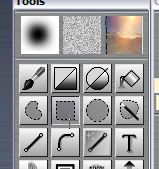 Go to the Tools panel, look for the selection tools below the first row of tools: Lasso, Rectangle, Oval and Magic Wand < Click the Rectangle selection tool (2nd row of tools)  click-and-drag a selection near the edges, but away enough from the border so as to avoid the dark noise. < click to enlarge After making such a selection, you can verify if it is small enough so the unwanted garbage along the edges is excluded. You can scrub through the timeline, or use the Lef/Right cursor (arrow) keys to quickly verify each frame.  Once you're satisfied with the selection, use the menu: Image > Crop to selection This will crop each frame of the animation to the selection.  Before you save the cropped animation to an AVI file, verify that it is of proper dimensions. It may be too small, and even worse, it may have an odd number of pixels in width or height. Some compression codecs require a multiple of 4 or 8 pixels in width or height, so be sure to resample to something more standard after cropping.  Here for example, we see the width at 219 pixels and height at 175 pixels. Definitely not acceptable by many codecs. We should resample up to 220 or down to 216, most likely for width. Select the menu: Image > Resample... to change the size to a more usable dimension in width and height. This will resize and resample all frames of an animation.  Notice that after resampling (or also after loading an image sequence from file) you may have an active alpha selection showing the full image selected,, as evidenced by the marching ants around the frame. Use Control-D or select menu: Alpha > Clear alpha if you find this distracting.  Here's an example of the finished animation, after cropping and resampling to the new size of 400x316 pixels, up from 219x175: |
| Serious
tools for aspiring Game Developers: 3impact a complete physics-enabled game engine!  - fabulous physics - - awesome visual fx - - powerful & easy to learn - - easy & royalty-free - only $99 Make games that make an impact - with 3impact! Use it with your own 3D scene creation and modeling tools! |
|
still
one of the best, now also very affordable! Poser5 Powerful 3D for stunning human figures, creatures and other 2-legged monsters :-)
Don't know how to use Poser? Get the VTC Tutorials! |

| intro | part 1 | part 2 | part 3 |
part 4 |
part 5 |
part 6 |
part 7 |
part
8 |