Digital
Painting has never been
so much fun: Learn to
paint with Particle Brushes!

PD
Particles - $19
A fun companion for your
digital
photo image editor!
powered
by Project
Dogwaffle

|
Getting
started with Digital
Painting on a slim budget:

PD
Artist now
$29!
Draw,
Sketch, Animate & Paint
powered
by Project
Dogwaffle
|
|
Tutorials:
|
intro - in the beginning, there was nothing but a blank
sheet of pixels
part 1 - getting started with Twisted
Brush Pro Studio
part 2 - Saving the image and
alpha
channel in a single file
part 3 - Loading an
image file straight to PD's Custom
Brush (w/Alpha)
part 4 - Loading an image and its Alpha Mask
from two files
part 5 - Discovering
new brushes:
Kaleidoscope!
part 6 - Painting
with Mandala brushes into AVI file to record as animation
part 7 - Mandala brush animation with
animated multi-frame brushes
part 8 - The
animated Brush Timeline edtor
|
Mandala!
Mandala!
|
Another fascinating
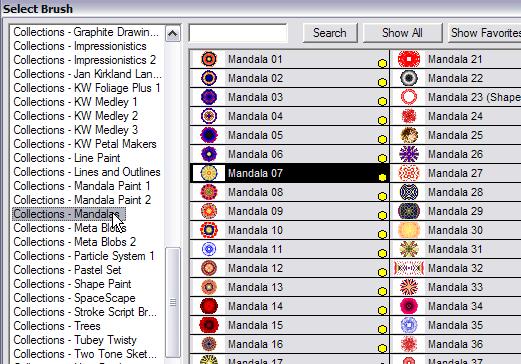
group of brushes are the Mandalas: Look for the Mandala collection, and
select one of them, such as #07
|
 |
When you paint with Mandala brushes, lots of colors and shapes appear
all over, perfect for Kaleidoscope effects. He're's again a sample
animation of a 2-3 second paint sequence, recorded into AVI straight
from Twistedbrush:
|
Recording into AVI
|
You can enable
recording of your painting activity in form of an AVI file.
|
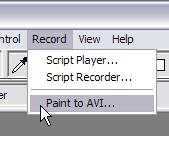
Select menu: Record > Paint
to AVI...
|
 By default the frequency is set to just a few
frames per minute. Be sure to increase the slider value to around
300-400 per minute so you can expect to record several frames per
second, perhaps a dozen of fps in fact. By default the frequency is set to just a few
frames per minute. Be sure to increase the slider value to around
300-400 per minute so you can expect to record several frames per
second, perhaps a dozen of fps in fact.
|
You will need to select a file name. You will also be asked to select a
video compressor (codec). Something like Xvid is fast and produces
small files, so can be used to record long sequences. In our case,
we're only going to record a few seconds, but at 10-20 fps you should
expect to get 100-200 frames in all, or possibly more.
 |
Here's
a screenshot of a single frame towards the end of using a Mandala brush.
|
 |
|
You
can click Start recording to being the recording sequence. When done,
click Stop. You can also Pause and Resume, which is great when you want
to change parameters such as size, color or even switch to a different
Mandala or totally different brush.
|
Into
PD Pro
|
Once
you've created an AVI file fromwithin Twistedbrush, you can load it
into PD Pro through its Animation menu:
Animation > Load AVI
|
From
there you can expect to have at it, to transfer subsets of the
frames or the entire frame sequence into a custom brush to paint with,
or to apply animated filters to the animation and turn it into even
more sophisticated animations. To learn more about video tools and
animation tools and effects in PD Pro, see
here
|
Here's an example of
a short Mandala sequence recorded and undergoing a series of post fx
filters in PD Pro's Timeline editor. We've also done a few other things
to it, such as turn some pieces loopable, removed or added blank
frames, time sctretched a sequence and much more.
Note: you'll see the
original avi click first, and it will be followed by a secon d click
with rotation, then another with fisheye distortion, sobel edge
detection, and so on, including Wireframe designer (3D terrain
oscilloscope look), There's a total of about 10 sequences, relax
and enjoy...
|
|
|
Other ways to use
the created animation or single image of Mandala based images abound.
Here's an example where the image was created in layer 2 against a
transparent background. It was saved to PNG file format, to keep the
transparency mask in the Alpha channel.

click image for original, larger version
You can then load this
image directly into PD Pro's custom brush system:
Dogwaffle-menu: Brush > Open...
Enable post FX like shadow drop and stamp the image once. CHange the
post FX to embossing, and use 'Shift-A' to stamp it down at the same
brush stroke position once more. Here's the result:

We'll explore the tools and steps involved with custom brushes next.
|
|
|
|
|
Inventory Blowout
Sale:
Poser 6 (boxed!) at
lowest prices:
for MacOs
or Windows
|
|